Quick Motion Patch Tool
The Quick Motion
Patch Tool allows you to quickly and easily manage the patching
of all axes and frames in CAD Wireframe view. The tool allows for axes
and frames to be patched or cleared from any created universe. A summary
of patching activity is also displayed in the tool for your convenience.
To patch frames/axes to a motion universe using the Quick
Motion Patch Tool
- Select the frames/axes you want to patch.
- From the menu,
choose >.
Result: The
Quick Motion Patch Tool window appears.
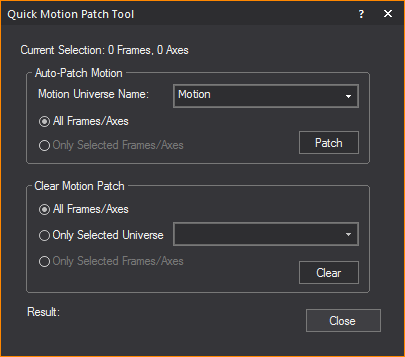
- In the Auto-Patch Motion section, from the Motion
Universe Name drop-down list, select the motion universe the
frames/axes will patch to.
- Select either All Frames/Axes or Only Selected
Frames/Axes to patch to the motion universe.
- Click Patch.
Result: The
chosen frames/axes will be patched to the selected motion universe. A
summary of the frames'/axes' patching will be displayed at the bottom
of the Quick Motion Patch Tool window.
To clear frames/axes from a motion universe using the Quick
Motion Patch Tool
- Select the frames/axes you want to clear.
- From the menu,
choose >.
Result: The
Quick Motion Patch Tool window appears.
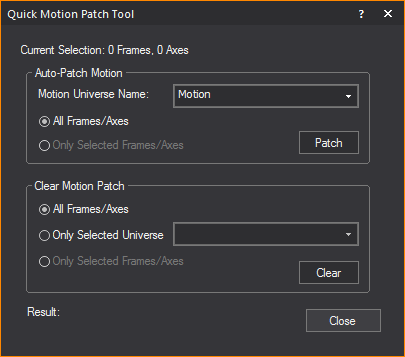
- In the Clear Motion Patch section, select either All
Frames/Axes or
Only Selected Frames/Axes to
be cleared the from the motion universe.
- Select Only Selected Universe radio
to clear the selected frames/axes from only a specific motion universe.
Select the specific universe from the drop-down list. Otherwise, the
selected frames/axes will be cleared from all universes.
- Click Clear.
- The chosen frames/axes will be cleared from the
selected motion universe. A summary of the frames'/axes' patching
will be displayed at the bottom of the Quick
Motion Patch Tool window.
 © CAST Group of Companies Inc., 2002-2023 All rights reserved.